Preparing your app for iOS 26
Our apps will be running on iOS 26 very soon, whether we like it or not. If I were low on capacity, here's how I'd prepare
Development, How To

Gabrielle Earnshaw
See if it works with iOS 26
- I'd test my current build on iOS 26 beta (either a test phone, or a service like Browserstack - definitely not your main phone)
If it works
If there were no issues with the app I'd:
- Wait until the stable release of iOS 26 (September)…
- Then transition to building with Xcode 26 (some code changes likely required)
This means you won't have to support separate streams for iOS 18 / iOS 26 ahead of September.
If it doesn't work
If the app didn't work with iOS 26 beta, it's more of a pain. Then I'd:
- Fix the issues in Xcode 26 beta, ready to update as soon as submissions are allowed
- Maintain a parallel branch in the current stack (Xcode 16) for updates before September
Here's what to keep in mind over the next few months:
- Your app might not work properly on iOS 26. It looks like it could break existing UI. System integrations (like audio/video) also need testing - and other things could break too.
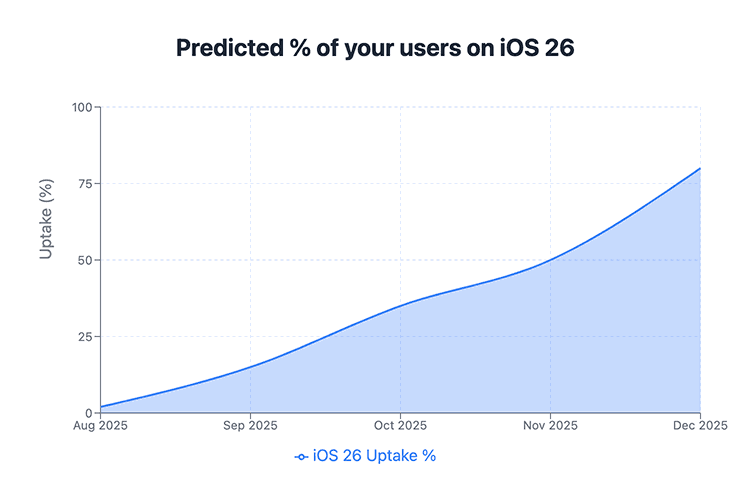
- The stable release will go out in September. Expect it to be with ~35%* of your audience by October, 50% by November, and 80% by December. So if your app is broken, that's what the size of your problem could be.
- You'll be able to submit updates with your existing stack until around April 2026. From then, you'll need to build with the latest version of the tooling (Xcode 26).
- You WON'T be able to submit updates with the new stack (Xcode 26) until closer to the stable release
(*) Figures are indicative from one of the apps I work with.
PS You can use Platform Watch to keep track of iOS releases.
Would you like help with this?
You can ask me anything for quick, free advice or get in touch to learn more about engaging my services.
Other articles you might be interested in:


If you found this article useful, why not subscribe to my newsletter?